Your first forecast
This tutorial runs the whole of DemandCast once. You retrieve data for four European countries, train a model on 2020–2023, check its error, and forecast the hourly demand of Spain in 2024. Follow Install first.
Before you start
- You need the API keys
ENTSOE_API_KEY(electricity demand),EMBER_API_KEY(annual demand per capita) andCDS_API_KEY(temperature). See Install. - The downloads take from minutes to hours, mostly for the temperature.
- Run every command from the
demandcast/folder.
Step 1: list the countries
Create the file config/tutorial_countries.yaml, which lists the countries by their codes:
entities:
  - country_name: France
    country_code: FRA
  - country_name: Germany
    country_code: DEU
  - country_name: Italy
    country_code: ITA
  - country_name: Spain
    country_code: ESP
The codes are ISO 3166 alpha-3 codes. Subdivisions, such as US states, use the format on this page.
Step 2: retrieve the data
Each run of retrieve.py downloads one kind of data (one variable). Instead of editing the default settings each time, make one small settings file per variable and pass it with --config.
2a. Population and annual electricity demand per capita. Retrieve these first: the cleaning of the electricity demand compares its annual totals with them.
# config/tutorial_population.yaml
variable: population
file: config/tutorial_countries.yaml
start_year: 2020
end_year: 2024
# config/tutorial_annual_demand.yaml
variable: annual_electricity_demand_per_capita
file: config/tutorial_countries.yaml
start_year: 2020
end_year: 2024
uv run retrieve.py --config config/tutorial_population.yaml
uv run retrieve.py --config config/tutorial_annual_demand.yaml
2b. GDP per capita.
# config/tutorial_gdp.yaml
variable: gdp_ppp_per_capita
file: config/tutorial_countries.yaml
start_year: 2020
end_year: 2024
uv run retrieve.py --config config/tutorial_gdp.yaml
2c. Hourly electricity demand, from ENTSO-E. This downloads all the years the source has, then cleans them and combines them into one hourly series per country.
# config/tutorial_demand.yaml
variable: electricity_demand
electricity_data_source: entsoe
file: config/tutorial_countries.yaml
uv run retrieve.py --config config/tutorial_demand.yaml
2d. Temperature. This also downloads the population grid it needs, to find where people live in each country.
# config/tutorial_temperature.yaml
variable: temperature
file: config/tutorial_countries.yaml
start_year: 2020
end_year: 2024
uv run retrieve.py --config config/tutorial_temperature.yaml
Everything lands in the data folder, data/ by default. If a country fails, the script goes on with the others and lists the failures at the end; the log in data/logs/ gives the reason.
Step 3: assemble the training data
assemble.py joins all the variables into one table, with one row per hour and country.
# config/tutorial_assemble_training.yaml
target_use: training
file: config/tutorial_countries.yaml
start_year: 2020
end_year: 2023
uv run assemble.py --config config/tutorial_assemble_training.yaml
It writes data/assembled/assembled_data_for_training_<time>.parquet, where <time> is the date and time of the run. Only years with at least 90% of their hours, and half of the hours of each month, are kept; see Assemble a dataset.
Step 4: train and validate a model
The default settings in config/train_config.yaml keep the most recent year of each country (2023) aside for testing, and train XGBoost on 2020–2022 with the latest assembled training data:
uv run train.py
The model goes to data/models/xgboost/xgboost_model_<time>.json, with a manifest that records the data and settings it was trained with.
Now measure its error on 2023, which it has not seen:
uv run validate.py
With empty settings, validate.py takes the latest model and the data it was trained on. The results go to data/results/validation/: the error of each country as WAPE and MAPE, and the hourly predictions of 2023. A WAPE of 5% means that the errors of all the hours, without their signs, add up to 5% of the demand of the year. Train and validate explains every output.
Step 5: assemble the forecasting data
To forecast Spain in 2024, assemble its inputs for that year. Create config/tutorial_spain.yaml:
entities:
  - country_name: Spain
    country_code: ESP
# config/tutorial_assemble_forecasting.yaml
target_use: forecasting
file: config/tutorial_spain.yaml
start_year: 2024
end_year: 2024
uv run assemble.py --config config/tutorial_assemble_forecasting.yaml
2024 is a past year, so no scenario is needed: the inputs are the observed values. For a future year, you would choose a scenario and a climate model; see Assemble a dataset.
Step 6: forecast
With empty settings, forecast.py uses the latest model and the latest forecasting data:
uv run forecast.py
The model predicts the shape of each hour relative to the year. forecast.py then scales it with the annual demand per capita times the population, so the hours of 2024 add up to Spain's annual demand. The result goes to data/results/forecasts/with_<model>/using_<data>/all_<time>.parquet.
Step 7: look at the result
import glob
import pandas as pd

path = sorted(glob.glob("data/results/forecasts/*/*/all_*.parquet"))[-1]
forecast = pd.read_parquet(path)
print(forecast[["Time (UTC)", "Entity code", "Forecast load (MW)"]].head())
print(forecast["Forecast load (MW)"].describe())
Each row is one hour: Time (UTC) is the end of the hour, and Forecast load (MW) is the mean demand during that hour.
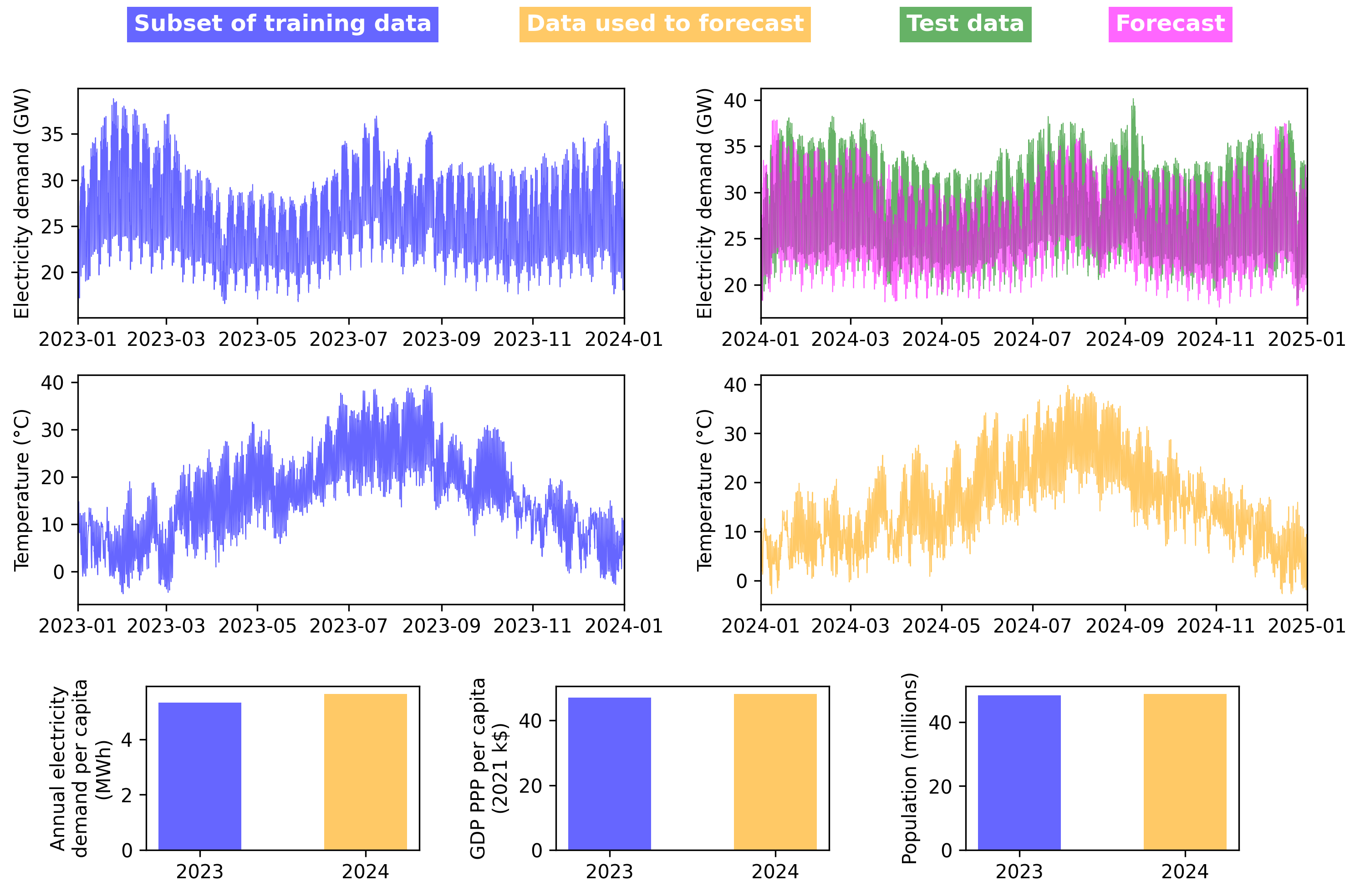
The figure below shows the same workflow for Spain: the retrieved demand of 2023 and 2024 at the top, and the inputs of the forecast below it.
What next
- Forecast a future year: retrieve the projections with a
scenarioand aclimate_model, and assemble with the matching options. See Weather and socio-economic inputs. - Forecast a place without data: list it in the forecasting codes file. The model needs only its inputs, not its demand.
- Estimate the error for places without data with cross-validation.
- Understand the models and how electricity demand data is cleaned.
Note
The paths above assume the default data folder. If you set DEMANDCAST_DATA_FOLDER, the files are in that folder instead.