
Workshop 1: Introduction to PyPSA & TYNDP reference grids#
Note
At the end of this notebook, you will be able to:
Describe the fundamentals and key architecture of PyPSA
Visualize and analyze the TYNDP reference grids within a PyPSA network
Analyze PyPSA network data and visualize results using PyPSA’s statistics module

PyPSA stands for Python for Power System Analysis.
PyPSA is an open source Python package for simulating and optimising modern energy systems that include features such as
conventional generators with unit commitment (ramp-up, ramp-down, start-up, shut-down),
time-varying wind and solar generation,
energy storage with efficiency losses and inflow/spillage for hydroelectricity
coupling to other energy sectors (electricity, transport, heat, industry),
conversion between energy carriers (e.g. electricity to hydrogen),
transmission networks (AC, DC, other fuels)
PyPSA can be used for a variety of problem types (e.g. electricity market modelling, long-term investment planning, transmission network expansion planning), and is designed to scale well with large networks and long time series.
Compared to building power system by hand in linopy, PyPSA does the following things for you:
manage data inputs
build optimisation problem
communicate with the solver
retrieve and process optimisation results
manage data outputs
Dependencies#
pandasfor storing data about network components and time seriesnumpyandscipyfor linear algebra and sparse matrix calculationsmatplotlibandcartopyfor plotting on a mapnetworkxfor network calculationslinopyfor handling optimisation problems
Note
Documentation for this package is available at https://pypsa.readthedocs.io.
Basic Structure#
Component |
Description |
|---|---|
Container for all components. |
|
Node where components attach. |
|
Energy carrier or technology (e.g. electricity, hydrogen, gas, coal, oil, biomass, on-/offshore wind, solar). Can track properties such as specific carbon dioxide emissions or nice names and colors for plots. |
|
Energy consumer (e.g. electricity demand). |
|
Generator (e.g. power plant, wind turbine, PV panel). |
|
Links connect two buses with controllable energy flow, direction-control and losses. They can be used to model:
|
|
Constraints affecting many components at once, such as emission limits. |
|
Not covered in this workshop |
|
Power distribution and transmission lines (overhead and cables). |
|
Standard line types. |
|
2-winding transformer. |
|
Standard types of 2-winding transformer. |
|
Shunt. |
|
Storage with fixed nominal energy-to-power ratio. |
|
Storage with separately extendable energy capacity. |
Note
Links in the table lead to documentation for each component.

Warning
Per unit values of voltage and impedance are used internally for network calculations. It is assumed internally that the base power is 1 MW.
From structured data to optimisation#
The design principle of PyPSA is that basically each component is associated with a set of variables and constraints that will be added to the optimisation model based on the input data stored for the components.
For an hourly electricity market simulation, PyPSA will solve an optimisation problem that looks like this
such that
Decision variables:
\(g_{i,s,t}\) is the generator dispatch at bus \(i\), technology \(s\), time step \(t\),
\(f_{\ell,t}\) is the power flow in line \(\ell\),
\(g_{i,r,t,\text{dis-/charge}}\) denotes the charge and discharge of storage unit \(r\) at bus \(i\) and time step \(t\),
\(e_{i,r,t}\) is the state of charge of storage \(r\) at bus \(i\) and time step \(t\).
Parameters:
\(o_{i,s}\) is the marginal generation cost of technology \(s\) at bus \(i\),
\(x_\ell\) is the reactance of transmission line \(\ell\),
\(K_{i\ell}\) is the incidence matrix,
\(C_{\ell c}\) is the cycle matrix,
\(G_{i,s}\) is the nominal capacity of the generator of technology \(s\) at bus \(i\),
\(F_{\ell}\) is the rating of the transmission line \(\ell\),
\(E_{i,r}\) is the energy capacity of storage \(r\) at bus \(i\),
\(\eta^{0/1/2}_{i,r,t}\) denote the standing (0), charging (1), and discharging (2) efficiencies.
Note
For a full reference to the optimisation problem description, see https://pypsa.readthedocs.io/en/latest/optimal_power_flow.html
Introduction to pypsa: a minimal dispatch problem#
Copyright (c) 2025, Iegor Riepin
Note
If you have not yet set up Python on your computer, you can execute this tutorial in your browser via Google Colab. Click on the rocket in the top right corner and launch “Colab”. If that doesn’t work download the .ipynb file and import it in Google Colab.
Then install the following packages by executing the following command in a Jupyter cell at the top of the notebook.
!pip install pypsa atlite pandas geopandas xarray matplotlib hvplot geoviews plotly highspy holoviews folium mapclassify
# To run this notebook in Google Colab, uncomment the following line:
# !pip install pypsa atlite pandas geopandas xarray matplotlib hvplot geoviews plotly highspy holoviews folium mapclassify
# By convention, PyPSA is imported without an alias:
import pypsa

# Other dependencies
import pandas as pd
import geopandas as gpd
import matplotlib.pyplot as plt
import holoviews as hv
import hvplot.pandas
import cartopy.crs as ccrs
import folium
import mapclassify
from pypsa.plot.maps.static import (
    add_legend_circles,
    add_legend_patches,
    add_legend_lines,
)
from pathlib import Path

plt.style.use("bmh")
Minimal electricity market problem#
generator 1: “gas” – marginal cost 70 EUR/MWh – capacity 50 MW
generator 2: “nuclear” – marginal cost 10 EUR/MWh – capacity 100 MW
load: “Consumer” – demand 120 MW
single time step (“now”)
single node (“Springfield”)
Building a basic network#
# First, we create a network object which serves as the container for all components
n1 = pypsa.Network(name="Demo")
n1
Empty PyPSA Network 'Demo'
--------------------
Components: none
Snapshots: 1
The second component we need are buses. Buses are the fundamental nodes of the network, to which all other components like loads, generators and transmission lines attach. They enforce energy conservation for all elements feeding in and out of it (i.e. Kirchhoff’s Current Law).
Components can be added to the network n using the n.add() function. It takes the component name as a first argument, the name of the component as a second argument and possibly further parameters as keyword arguments. Let’s use this function, to add buses for each country to our network:
n1.add("Carrier", "AC")
n1.add("Bus", "Springfield", v_nom=380, carrier="AC")
For each class of components, the data describing the components is stored in a pandas.DataFrame. For example, all static data for buses is stored in n.buses
n1.buses
| v_nom | type | x | y | carrier | unit | location | v_mag_pu_set | v_mag_pu_min | v_mag_pu_max | control | generator | sub_network | |
|---|---|---|---|---|---|---|---|---|---|---|---|---|---|
| name | |||||||||||||
| Springfield | 380.0 | 0.0 | 0.0 | AC | 1.0 | 0.0 | inf | PQ |
You see there are many more attributes than we specified while adding the buses; many of them are filled with default parameters which were added. You can look up the field description, defaults and status (required input, optional input, output) for buses here https://pypsa.readthedocs.io/en/latest/components.html#bus, and analogous for all other components.
You can also explore attributes yourself.
n1.component_attrs["Bus"]
# n1.component_attrs["Generator"]
# n1.component_attrs["Link"]
# n1.component_attrs["Load"]
/tmp/ipykernel_2630/4030119862.py:1: DeprecatedWarning: component_attrs is deprecated as of 1.0.0 and will be removed in 2.0.0. Use `self.components.<component>.defaults` instead.
  n1.component_attrs["Bus"]
| type | unit | default | description | status | static | varying | typ | dtype | |
|---|---|---|---|---|---|---|---|---|---|
| attribute | |||||||||
| name | string | NaN | Unique name | Input (required) | True | False | <class 'str'> | object | |
| v_nom | float | kV | 1.0 | Nominal voltage | Input (optional) | True | False | <class 'float'> | float64 |
| type | string | NaN | Placeholder for bus type. Not implemented. | Input (optional) | True | False | <class 'str'> | object | |
| x | float | NaN | 0.0 | Longitude; the Spatial Reference System Identi... | Input (optional) | True | False | <class 'float'> | float64 |
| y | float | NaN | 0.0 | Latitude; the Spatial Reference System Identif... | Input (optional) | True | False | <class 'float'> | float64 |
| carrier | string | NaN | AC | Carrier, such as "AC", "DC", "heat" or "gas". | Input (optional) | True | False | <class 'str'> | object |
| unit | string | NaN | Unit of the bus' carrier if the implicitly ass... | Input (optional) | True | False | <class 'str'> | object | |
| location | string | NaN | Location of the bus. Does not influence the op... | Input (optional) | True | False | <class 'str'> | object | |
| v_mag_pu_set | static or series | per unit | 1.0 | Voltage magnitude set point, per unit of `v_nom`. | Input (optional) | True | True | <class 'float'> | float64 |
| v_mag_pu_min | float | per unit | 0.0 | Minimum desired voltage, per unit of `v_nom`. ... | Input (optional) | True | False | <class 'float'> | float64 |
| v_mag_pu_max | float | per unit | inf | Maximum desired voltage, per unit of `v_nom`. ... | Input (optional) | True | False | <class 'float'> | float64 |
| control | string | NaN | PQ | P,Q,V control strategy for power flow, must be... | Output | True | False | <class 'str'> | object |
| generator | string | NaN | Name of slack generator attached to slack bus. | Output | True | False | <class 'str'> | object | |
| sub_network | string | NaN | Name of connected sub-network to which bus bel... | Output | True | False | <class 'str'> | object | |
| p | series | MW | 0.0 | active power at bus (positive if net generatio... | Output | False | True | <class 'float'> | float64 |
| q | series | MVar | 0.0 | reactive power (positive if net generation at ... | Output | False | True | <class 'float'> | float64 |
| v_mag_pu | series | per unit | 1.0 | Voltage magnitude, per unit of `v_nom` | Output | False | True | <class 'float'> | float64 |
| v_ang | series | radians | 0.0 | Voltage angle | Output | False | True | <class 'float'> | float64 |
| marginal_price | series | currency/MWh | 0.0 | Shadow price from energy balance constraint | Output | False | True | <class 'float'> | float64 |
The n.add() function lets you add any component to the network object n:
n1.add(
    "Generator",
    "gas",
    carrier="AC",
    bus="Springfield",
    p_nom_extendable=False,
    marginal_cost=70,  # €/MWh
    p_nom=50,  # MW
)
n1.add(
    "Generator",
    "nuclear",
    carrier="AC",
    bus="Springfield",
    p_nom_extendable=False,
    marginal_cost=10,  # €/MWh
    p_nom=100,  # MW
)
The method n.add() also allows you to add multiple components at once. For instance, multiple carriers for the fuels with information on specific carbon dioxide emissions, a nice name, and colors for plotting. For this, the function takes the component name as the first argument and then a list of component names and then optional arguments for the parameters. Here, scalar values, lists, dictionary or pandas.Series are allowed. The latter two needs keys or indices with the component names.
As a result, the n.generators DataFrame looks like this:
n1.generators
| bus | control | type | p_nom | p_nom_mod | p_nom_extendable | p_nom_min | p_nom_max | p_nom_set | p_min_pu | ... | min_up_time | min_down_time | up_time_before | down_time_before | ramp_limit_up | ramp_limit_down | ramp_limit_start_up | ramp_limit_shut_down | weight | p_nom_opt | |
|---|---|---|---|---|---|---|---|---|---|---|---|---|---|---|---|---|---|---|---|---|---|
| name | |||||||||||||||||||||
| gas | Springfield | PQ | 50.0 | 0.0 | False | 0.0 | inf | NaN | 0.0 | ... | 0 | 0 | 1 | 0 | NaN | NaN | NaN | NaN | 1.0 | 0.0 | |
| nuclear | Springfield | PQ | 100.0 | 0.0 | False | 0.0 | inf | NaN | 0.0 | ... | 0 | 0 | 1 | 0 | NaN | NaN | NaN | NaN | 1.0 | 0.0 |
2 rows × 42 columns
Next, we’re going to add the electricity demand.
A positive value for p_set means consumption of power from the bus.
n1.add(
    "Load",
    "Small town",
    carrier="AC",
    bus="Springfield",
    p_set=120,  # MW
)
n1.loads
| bus | carrier | type | p_set | q_set | sign | active | |
|---|---|---|---|---|---|---|---|
| name | |||||||
| Small town | Springfield | AC | 120.0 | 0.0 | -1.0 | True |
Optimisation#
The design principle of PyPSA is that basically each component is associated with a set of variables and constraints that will be added to the optimisation model based on the input data stored for the components.
For this dispatch problem, PyPSA will solve an optimisation problem that looks like this
such that
Decision variables:
\(g_{s,t}\) is the generator dispatch of technology \(s\) at time \(t\)
Parameters:
\(o_{s}\) is the marginal generation cost of technology \(s\)
\(G_{s}\) is the nominal capacity of technology \(s\)
\(D_t\) is the power demand in Springfield at time \(t\)
With all input data transferred into the PyPSA’s data structure (network), we can now build and run the resulting optimisation problem. In PyPSA, building, solving and retrieving results from the optimisation model is contained in a single function call n.optimize(). This function optimizes dispatch and investment decisions for least cost adhering to the constraints defined in the network.
The n.optimize() function can take a variety of arguments. The most relevant for the moment is the choice of the solver (e.g. “highs” and “gurobi”). They need to be installed on your computer, to use them here!
n1.optimize(solver_name="highs")
/tmp/ipykernel_2630/3770700743.py:1: FutureWarning: The default value of `include_objective_constant` will change from True to False in version 2.0. Set `include_objective_constant` explicitly to suppress this warning. Using False improves LP numerical conditioning by not including the objective constant as a variable.
  n1.optimize(solver_name="highs")
INFO:linopy.model: Solve problem using Highs solver
INFO:linopy.io: Writing time: 0.02s
INFO:linopy.constants: Optimization successful:
Status: ok
Termination condition: optimal
Solution: 2 primals, 5 duals
Objective: 2.40e+03
Solver model: available
Solver message: Optimal
INFO:pypsa.optimization.optimize:The shadow-prices of the constraints Generator-fix-p-lower, Generator-fix-p-upper were not assigned to the network.
Running HiGHS 1.15.1 (git hash: 04024d7): Copyright (c) 2026 under MIT licence terms
Includes third-party software components, see THIRD_PARTY_NOTICES.md for full details
LP linopy-problem-rp507cji has 5 rows; 2 cols; 6 nonzeros
Coefficient ranges:
  Matrix  [1e+00, 1e+00]
  Cost    [1e+01, 7e+01]
  Bound   [0e+00, 0e+00]
  RHS     [5e+01, 1e+02]
Presolving model
0 rows, 0 cols, 0 nonzeros 0s
0 rows, 0 cols, 0 nonzeros 0s
Presolve reductions: rows 0(-5); columns 0(-2); nonzeros 0(-6) - Reduced to empty
Performed postsolve
Solving the original LP from the solution after postsolve

Model name          : linopy-problem-rp507cji
Model status        : Optimal
Objective value     :  2.4000000000e+03
P-D objective error :  0.0000000000e+00
HiGHS run time      :          0.00
('ok', 'optimal')
Let’s have a look at the results. The network object n contains now the objective value and the results for the decision variables.
n1.objective
2400.0
Since the power flow and dispatch are generally time-varying quantities, these are stored in a different locations than e.g. n.generators. They are stored in n.generators_t. Thus, to find out the dispatch of the generators, run
n1.generators_t.p
| name | gas | nuclear |
|---|---|---|
| snapshot | ||
| now | 20.0 | 100.0 |
n1.buses_t.marginal_price
| name | Springfield |
|---|---|
| snapshot | |
| now | 70.0 |
Explore pypsa model#
n1.model
Linopy LP model
===============

Variables:
----------
 * Generator-p (snapshot, name)

Constraints:
------------
 * Generator-fix-p-lower (snapshot, name)
 * Generator-fix-p-upper (snapshot, name)
 * Bus-nodal_balance (name, snapshot)

Status:
-------
ok
n1.model.constraints
linopy.model.Constraints
------------------------
 * Generator-fix-p-lower (snapshot, name)
 * Generator-fix-p-upper (snapshot, name)
 * Bus-nodal_balance (name, snapshot)
n1.model.constraints["Generator-fix-p-upper"]
Constraint `Generator-fix-p-upper` [snapshot: 1, name: 2]:
----------------------------------------------------------
[now, gas]: +1 Generator-p[now, gas]         ≤ 50.0
[now, nuclear]: +1 Generator-p[now, nuclear] ≤ 100.0
n1.model.constraints["Bus-nodal_balance"]
Constraint `Bus-nodal_balance` [name: 1, snapshot: 1]:
------------------------------------------------------
[Springfield, now]: +1 Generator-p[now, gas] + 1 Generator-p[now, nuclear] = 120.0
n1.model.objective
Objective:
----------
LinearExpression: +70 Generator-p[now, gas] + 10 Generator-p[now, nuclear]
Sense: min
Value: 2400.0
# save network for later reuse
n1.export_to_netcdf("n1.nc")
INFO:pypsa.network.io:Exported network 'Demo' saved to 'n1.nc contains: generators, buses, carriers, sub_networks, loads
<xarray.Dataset> Size: 320B
Dimensions:                   (snapshots: 1, generators_i: 2,
                               generators_t_p_i: 2, buses_i: 1,
                               buses_t_marginal_price_i: 1, carriers_i: 1,
                               sub_networks_i: 1, loads_i: 1, loads_t_p_i: 1)
Coordinates:
  * snapshots                 (snapshots) int64 8B 0
  * generators_i              (generators_i) object 16B 'gas' 'nuclear'
  * generators_t_p_i          (generators_t_p_i) object 16B 'gas' 'nuclear'
  * buses_i                   (buses_i) object 8B 'Springfield'
  * buses_t_marginal_price_i  (buses_t_marginal_price_i) object 8B 'Springfield'
  * carriers_i                (carriers_i) object 8B 'AC'
  * sub_networks_i            (sub_networks_i) object 8B '0'
  * loads_i                   (loads_i) object 8B 'Small town'
  * loads_t_p_i               (loads_t_p_i) object 8B 'Small town'
Data variables: (12/22)
    snapshots_snapshot        (snapshots) object 8B 'now'
    snapshots_objective       (snapshots) int64 8B 1
    snapshots_stores          (snapshots) int64 8B 1
    snapshots_generators      (snapshots) int64 8B 1
    generators_bus            (generators_i) object 16B 'Springfield' 'Spring...
    generators_control        (generators_i) object 16B 'Slack' 'PQ'
    ...                        ...
    sub_networks_slack_bus    (sub_networks_i) object 8B 'Springfield'
    sub_networks_obj          (sub_networks_i) float64 8B nan
    loads_bus                 (loads_i) object 8B 'Springfield'
    loads_carrier             (loads_i) object 8B 'AC'
    loads_p_set               (loads_i) float64 8B 120.0
    loads_t_p                 (snapshots, loads_t_p_i) float64 8B 120.0
Attributes:
    network__linearized_uc:       0
    network__multi_invest:        0
    network__objective:           2400.0
    network__objective_constant:  0.0
    network_name:                 Demo
    network_pypsa_version:        1.2.4
    network_srid:                 4326
    crs:                          {"_crs": "GEOGCRS[\"WGS 84\",ENSEMBLE[\"Wor...
meta: {}Task 1: Add another town to the model#
The new town Shelbyville consists of:
one coal power plant with a capacity of 100 MW and marginal cost of 50 €/MWh
a transmission line with net transfer capacity of 10 MW
a Load of 70 MW
Hint: you can use the link component to add NTC representations of transmission lines like this:
n.add(
    "Link",
    "Transmission Line",
    bus0="TownA",
    bus1="TownB",
    p_nom=...,
    carrier="AC",
    p_min_pu=-1  # For bidirectional links
)
# Your solution
Building the reference grids#
The minimal PyPSA example illustrates how time-consuming it can be to compose a network by hand. To simplify the work, PyPSA-Eur provides a set of scripts that does this for you. It collects and processes open data, composes a network, writes the constraints, solves the operation and capacity expansion problem, collects the result and produces basic summary outputs for analysis.
The current open-tyndp project aims to adapt PyPSA-Eur to the specific needs of the TYNDP process. All the code is openly available in the project repository: open-tyndp. Currently, the workflow implements the reference grid data for both the electricity and hydrogen networks and solves the network with the default PyPSA-Eur demand.
As any open-source repository, you can get the code, contribute using pull requests, report issues and submit feature requests.
Load example data#
For this workshop, we have prepared networks, dated to the 9th of April 2025, that can be explored immediately:
pre-network: The network prepared by the workflow before solving it.post-network: The solved network.
As this workshop focuses on the reference grid, we will also explore the bidding zones data we have created.
from urllib.request import urlretrieve

urls = {
    "pre-network.nc": "https://storage.googleapis.com/open-tyndp-data-store/workshop-01/pre-network.nc",
    "post-network.nc": "https://storage.googleapis.com/open-tyndp-data-store/workshop-01/post-network.nc",
    "bidding_zones.geojson": "https://storage.googleapis.com/open-tyndp-data-store/workshop-01/bidding_zones.geojson",
}
for name, url in urls.items():
    print(f"Retrieving {name} from storage.")
    urlretrieve(url, name)
print("Done")
Retrieving pre-network.nc from storage.
Retrieving post-network.nc from storage.
Retrieving bidding_zones.geojson from storage.
Done
First, let’s load a pre-composed PyPSA Network:
n2 = pypsa.Network("pre-network.nc")
WARNING:pypsa.network.io:Importing network from PyPSA version v0.34.1 while current version is v1.2.4. Read the release notes at `https://go.pypsa.org/release-notes` to prepare your network for import.
INFO:pypsa.network.io:Imported network 'PyPSA-Eur (tyndp-raw)' has buses, carriers, generators, global_constraints, links, loads, shapes, storage_units, stores
And let’s get a general overview of the components in it:
n2
PyPSA Network 'PyPSA-Eur (tyndp-raw)'
-------------------------------------
Components:
 - Bus: 680
 - Carrier: 101
 - Generator: 661
 - GlobalConstraint: 2
 - Link: 2338
 - Load: 338
 - Shape: 62
 - StorageUnit: 69
 - Store: 350
Snapshots: 1460
We have buses which represent the different nodes in the model where components attach.
n2.buses.head()
| v_nom | type | x | y | carrier | unit | location | v_mag_pu_set | v_mag_pu_min | v_mag_pu_max | control | generator | sub_network | substation_off | country | substation_lv | |
|---|---|---|---|---|---|---|---|---|---|---|---|---|---|---|---|---|
| name | ||||||||||||||||
| AL00 | 380.0 | 20.036884 | 41.117588 | AC | MWh_el | AL00 | 1.0 | 0.0 | inf | PQ | 1.0 | AL | 1.0 | |||
| AT00 | 380.0 | 14.822183 | 47.668898 | AC | MWh_el | AT00 | 1.0 | 0.0 | inf | PQ | 1.0 | AT | 1.0 | |||
| BA00 | 380.0 | 17.867837 | 43.982016 | AC | MWh_el | BA00 | 1.0 | 0.0 | inf | PQ | 1.0 | BA | 1.0 | |||
| BE00 | 380.0 | 4.967931 | 50.470635 | AC | MWh_el | BE00 | 1.0 | 0.0 | inf | PQ | 1.0 | BE | 1.0 | |||
| BG00 | 380.0 | 25.323948 | 42.668760 | AC | MWh_el | BG00 | 1.0 | 0.0 | inf | PQ | 1.0 | BG | 1.0 |
And let’s look at electric buses for a specific country.
n2.buses.query("country=='IT' and carrier=='AC'")
| v_nom | type | x | y | carrier | unit | location | v_mag_pu_set | v_mag_pu_min | v_mag_pu_max | control | generator | sub_network | substation_off | country | substation_lv | |
|---|---|---|---|---|---|---|---|---|---|---|---|---|---|---|---|---|
| name | ||||||||||||||||
| ITCA | 380.0 | 16.634892 | 38.985885 | AC | MWh_el | ITCA | 1.0 | 0.0 | inf | PQ | 1.0 | IT | 1.0 | |||
| ITCN | 380.0 | 11.238605 | 43.418039 | AC | MWh_el | ITCN | 1.0 | 0.0 | inf | PQ | 1.0 | IT | 1.0 | |||
| ITCS | 380.0 | 13.162117 | 41.846461 | AC | MWh_el | ITCS | 1.0 | 0.0 | inf | PQ | 1.0 | IT | 1.0 | |||
| ITN1 | 380.0 | 9.703872 | 45.440276 | AC | MWh_el | ITN1 | 1.0 | 0.0 | inf | PQ | 1.0 | IT | 1.0 | |||
| ITS1 | 380.0 | 16.501565 | 40.927422 | AC | MWh_el | ITS1 | 1.0 | 0.0 | inf | PQ | 1.0 | IT | 1.0 | |||
| ITSA | 380.0 | 9.097371 | 40.067626 | AC | MWh_el | ITSA | 1.0 | 0.0 | inf | PQ | 1.0 | IT | 1.0 | |||
| ITSI | 380.0 | 13.863833 | 37.546811 | AC | MWh_el | ITSI | 1.0 | 0.0 | inf | PQ | 1.0 | IT | 1.0 | |||
| ITVI | 380.0 | 13.863833 | 37.546811 | AC | MWh_el | ITVI | 1.0 | 0.0 | inf | PQ | 0.0 | IT | 0.0 | |||
| IT H2 Z2 DRES | 380.0 | 16.634892 | 38.985885 | AC | MWh_el | IT H2 Z2 | 1.0 | 0.0 | inf | PQ | 1.0 | IT | 1.0 |
Generators which represent generating units (e.g. wind turbine, PV panel):
n2.generators.head()
| bus | control | type | p_nom | p_nom_mod | p_nom_extendable | p_nom_min | p_nom_max | p_nom_set | p_min_pu | ... | up_time_before | down_time_before | ramp_limit_up | ramp_limit_down | ramp_limit_start_up | ramp_limit_shut_down | weight | p_nom_opt | location | unit | |
|---|---|---|---|---|---|---|---|---|---|---|---|---|---|---|---|---|---|---|---|---|---|
| name | |||||||||||||||||||||
| AL00 offwind-ac | AL00 | PQ | 0.000000 | 0.0 | True | 0.000000 | 3160.441247 | NaN | 0.0 | ... | 1 | 0 | NaN | NaN | NaN | NaN | 1.0 | 0.0 | |||
| BA00 offwind-ac | BA00 | PQ | 0.000000 | 0.0 | True | 0.000000 | 16.871211 | NaN | 0.0 | ... | 1 | 0 | NaN | NaN | NaN | NaN | 1.0 | 0.0 | |||
| BE00 offwind-ac | BE00 | PQ | 1053.971009 | 0.0 | True | 1053.971009 | 1053.971009 | NaN | 0.0 | ... | 1 | 0 | NaN | NaN | NaN | NaN | 1.0 | 0.0 | |||
| BG00 offwind-ac | BG00 | PQ | 0.000000 | 0.0 | True | 0.000000 | 1598.925797 | NaN | 0.0 | ... | 1 | 0 | NaN | NaN | NaN | NaN | 1.0 | 0.0 | |||
| CY00 offwind-ac | CY00 | PQ | 0.000000 | 0.0 | True | 0.000000 | 2057.040496 | NaN | 0.0 | ... | 1 | 0 | NaN | NaN | NaN | NaN | 1.0 | 0.0 |
5 rows × 44 columns
Links connect two buses with controllable energy flow, direction-control and losses. They can be used to model:
- HVAC lines (neglecting KVL, only net transfer capacities (NTCs))
- HVDC links
- conversion between carriers (e.g. electricity to hydrogen in electrolysis)
PyPSA-Eur uses DC as the conventional carrier for electrical transmission lines modelled as Link. AC is used as the conventional carrier for electrical transmission Line.
n2.links.head()
| bus0 | bus1 | bus2 | bus3 | bus4 | type | carrier | efficiency | efficiency2 | efficiency3 | ... | geometry | underwater_fraction | voltage | reversed | dc | length_original | tags | underground | location | under_construction | |
|---|---|---|---|---|---|---|---|---|---|---|---|---|---|---|---|---|---|---|---|---|---|
| name | |||||||||||||||||||||
| AL00-GR00-DC | AL00 | GR00 | DC | 1.0 | 1.0 | 1.0 | ... | LINESTRING (20.036883988642362 41.117587702511... | 0.0 | 380.0 | False | 1.0 | 219.635111 | AL00 -> GR00 | 1.0 | 0.0 | |||||
| AL00-ME00-DC | AL00 | ME00 | DC | 1.0 | 1.0 | 1.0 | ... | LINESTRING (20.036883988642362 41.117587702511... | 0.0 | 380.0 | False | 1.0 | 189.342890 | AL00 -> ME00 | 1.0 | 0.0 | |||||
| AL00-MK00-DC | AL00 | MK00 | DC | 1.0 | 1.0 | 1.0 | ... | LINESTRING (20.036883988642362 41.117587702511... | 0.0 | 380.0 | False | 1.0 | 153.308707 | AL00 -> MK00 | 1.0 | 0.0 | |||||
| AL00-RS00-DC | AL00 | RS00 | DC | 1.0 | 1.0 | 1.0 | ... | LINESTRING (20.036883988642362 41.117587702511... | 0.0 | 380.0 | False | 1.0 | 351.420535 | AL00 -> RS00 | 1.0 | 0.0 | |||||
| AT00-CH00-DC | AT00 | CH00 | DC | 1.0 | 1.0 | 1.0 | ... | LINESTRING (14.822183225330722 47.668898155000... | 0.0 | 380.0 | False | 1.0 | 502.028400 | AT00 -> CH00 | 1.0 | 0.0 |
5 rows × 65 columns
You can filter a country.
n2.links.query("index.str.contains('DE')").head()
| bus0 | bus1 | bus2 | bus3 | bus4 | type | carrier | efficiency | efficiency2 | efficiency3 | ... | geometry | underwater_fraction | voltage | reversed | dc | length_original | tags | underground | location | under_construction | |
|---|---|---|---|---|---|---|---|---|---|---|---|---|---|---|---|---|---|---|---|---|---|
| name | |||||||||||||||||||||
| AT00-DE00-DC | AT00 | DE00 | DC | 1.0 | 1.0 | 1.0 | ... | LINESTRING (14.822183225330722 47.668898155000... | 0.0 | 380.0 | False | 1.0 | 512.754700 | AT00 -> DE00 | 1.0 | 0.0 | |||||
| BE00-DE00-DC | BE00 | DE00 | DC | 1.0 | 1.0 | 1.0 | ... | LINESTRING (4.96793113501169 50.47063494467691... | 0.0 | 380.0 | False | 1.0 | 369.599774 | BE00 -> DE00 | 1.0 | 0.0 | |||||
| CH00-DE00-DC | CH00 | DE00 | DC | 1.0 | 1.0 | 1.0 | ... | LINESTRING (8.343016848147014 46.7336228266206... | 0.0 | 380.0 | False | 1.0 | 503.448277 | CH00 -> DE00 | 1.0 | 0.0 | |||||
| CZ00-DE00-DC | CZ00 | DE00 | DC | 1.0 | 1.0 | 1.0 | ... | LINESTRING (15.66368315845627 49.7526624846696... | 0.0 | 380.0 | False | 1.0 | 422.050833 | CZ00 -> DE00 | 1.0 | 0.0 | |||||
| DE00-AT00-DC | DE00 | AT00 | DC | 1.0 | 1.0 | 1.0 | ... | LINESTRING (10.11340015140031 51.1099148631177... | 0.0 | 380.0 | False | 1.0 | 512.754700 | DE00 -> AT00 | 1.0 | 0.0 |
5 rows × 65 columns
The workflow also attaches Load to the network. As the load is a time sensitive information, the data is stored in n.loads_t. The provided network uses the default PyPSA-Eur loads.
n2.loads_t.p_set.head()
| name | AL00 | AL00 rural heat | AL00 urban central heat | AL00 urban decentral heat | AT00 | AT00 rural heat | AT00 urban central heat | AT00 urban decentral heat | BA00 | BA00 rural heat | ... | SE04 urban central heat | SE04 urban decentral heat | SI00 | SI00 rural heat | SI00 urban central heat | SI00 urban decentral heat | SK00 | SK00 rural heat | SK00 urban central heat | SK00 urban decentral heat |
|---|---|---|---|---|---|---|---|---|---|---|---|---|---|---|---|---|---|---|---|---|---|
| snapshot | |||||||||||||||||||||
| 2013-01-01 00:00:00 | 15.615227 | 282.506609 | 100.862099 | 399.550342 | 2261.152656 | 5299.187556 | 2959.617093 | 4815.843301 | 369.028253 | 1230.518567 | ... | 3735.243444 | 3030.248561 | 242.853529 | 1050.521410 | 468.016657 | 1005.381975 | 555.560474 | 2914.137701 | 1652.668130 | 2617.235747 |
| 2013-01-01 06:00:00 | 8.845663 | 337.899701 | 120.638852 | 477.893037 | 2614.686560 | 6535.518316 | 3650.112685 | 5939.407083 | 627.370402 | 1531.941632 | ... | 4617.937494 | 3746.341746 | 210.530542 | 1302.020206 | 580.061614 | 1246.074220 | 531.527149 | 3549.311197 | 2012.888236 | 3187.695673 |
| 2013-01-01 12:00:00 | 92.889863 | 314.005839 | 112.108131 | 444.099842 | 3061.051327 | 6092.180338 | 3402.506680 | 5536.506410 | 761.419625 | 1430.188532 | ... | 4317.083443 | 3502.271295 | 261.489294 | 1214.291522 | 540.977703 | 1162.115115 | 717.483613 | 3256.597449 | 1846.884179 | 2924.804566 |
| 2013-01-01 18:00:00 | 116.046205 | 273.512188 | 97.650860 | 386.829493 | 2847.895011 | 5253.677984 | 2934.199818 | 4774.484704 | 709.176808 | 1230.355265 | ... | 3729.798524 | 3025.831323 | 284.230236 | 1045.503347 | 465.781066 | 1000.579531 | 798.943142 | 2778.676638 | 1575.845342 | 2495.575903 |
| 2013-01-02 00:00:00 | 47.356300 | 263.309378 | 94.008195 | 372.399614 | 2499.969104 | 4940.542555 | 2759.312449 | 4489.910674 | 368.875138 | 1049.628230 | ... | 4649.657481 | 3772.074860 | 241.699556 | 968.754496 | 431.588768 | 927.128471 | 572.968441 | 2981.108978 | 1690.648934 | 2677.383769 |
5 rows × 196 columns
PyPSA-Eur makes use of GlobalConstraints to limit, for example, the total line expansion and the global carbon emissions.
n2.global_constraints
| type | investment_period | bus | carrier_attribute | sense | constant | mu | |
|---|---|---|---|---|---|---|---|
| name | |||||||
| lv_limit | transmission_volume_expansion_limit | NaN | AC, DC | <= | 1.555173e+08 | 0.0 | |
| CO2Limit | co2_atmosphere | NaN | co2_emissions | <= | 1.111461e+09 | 0.0 |
Explore bidding zones#
Let’s start by examining the bidding zones, which define the spatial resolution of the electricity grid for the Scenario Building.
First, let’s load and explore the bidding zone shapes that we created for the model:
bz = gpd.read_file("bidding_zones.geojson")
bz.head()
| zone_name | country | cross_country_zone | geometry | |
|---|---|---|---|---|
| 0 | AL00 | AL | None | MULTIPOLYGON (((20.56881 41.87367, 20.50041 42... |
| 1 | AT00 | AT | None | MULTIPOLYGON (((16.94357 48.60406, 16.87157 48... |
| 2 | BA00 | BA | None | MULTIPOLYGON (((19.02249 44.85585, 18.84298 44... |
| 3 | BE00 | BE | None | MULTIPOLYGON (((2.52183 51.08698, 2.59023 50.8... |
| 4 | BG00 | BG | None | MULTIPOLYGON (((26.33246 41.71339, 26.54847 41... |
Let’s use a nice interactive plotting package to plot the regions.
.hvplot() is a powerful and interactive Pandas-like .plot() API. You just replace .plot() with .hvplot() and you get an interactive figure.
Documentation can be found here: https://hvplot.holoviz.org/index.html
hv.extension("bokeh")
bz.hvplot(
    geo=True,
    tiles="OSM",
    hover_cols=["zone_name", "country"],
    c="zone_name",
    frame_height=700,
    frame_width=1000,
    alpha=0.2,
    legend=False,
).opts(xaxis=None, yaxis=None, active_tools=["pan", "wheel_zoom"])


Task: You can take some time to explore the bidding zones geographies.
Explore the Electricity reference grid#
The Electricity reference grid in the PyPSA model is implemented as HVAC lines that neglect KVL and only model net transfer capacities (NTCs). This approach is referred to as a Transport Model.
This is referred to as a Transport Model.
In PyPSA, this can be represented by the link component with carrier set to ‘DC’.
Let’s have a look at those links:
reference_grid_elec = n2.links.query("carrier == 'DC'")
reference_grid_elec.head()
| bus0 | bus1 | bus2 | bus3 | bus4 | type | carrier | efficiency | efficiency2 | efficiency3 | ... | geometry | underwater_fraction | voltage | reversed | dc | length_original | tags | underground | location | under_construction | |
|---|---|---|---|---|---|---|---|---|---|---|---|---|---|---|---|---|---|---|---|---|---|
| name | |||||||||||||||||||||
| AL00-GR00-DC | AL00 | GR00 | DC | 1.0 | 1.0 | 1.0 | ... | LINESTRING (20.036883988642362 41.117587702511... | 0.0 | 380.0 | False | 1.0 | 219.635111 | AL00 -> GR00 | 1.0 | 0.0 | |||||
| AL00-ME00-DC | AL00 | ME00 | DC | 1.0 | 1.0 | 1.0 | ... | LINESTRING (20.036883988642362 41.117587702511... | 0.0 | 380.0 | False | 1.0 | 189.342890 | AL00 -> ME00 | 1.0 | 0.0 | |||||
| AL00-MK00-DC | AL00 | MK00 | DC | 1.0 | 1.0 | 1.0 | ... | LINESTRING (20.036883988642362 41.117587702511... | 0.0 | 380.0 | False | 1.0 | 153.308707 | AL00 -> MK00 | 1.0 | 0.0 | |||||
| AL00-RS00-DC | AL00 | RS00 | DC | 1.0 | 1.0 | 1.0 | ... | LINESTRING (20.036883988642362 41.117587702511... | 0.0 | 380.0 | False | 1.0 | 351.420535 | AL00 -> RS00 | 1.0 | 0.0 | |||||
| AT00-CH00-DC | AT00 | CH00 | DC | 1.0 | 1.0 | 1.0 | ... | LINESTRING (14.822183225330722 47.668898155000... | 0.0 | 380.0 | False | 1.0 | 502.028400 | AT00 -> CH00 | 1.0 | 0.0 |
5 rows × 65 columns
That’s a lot of information! Let’s filter out some useful attributes.
reference_grid_elec.loc[:, ["bus0", "bus1", "p_nom", "p_nom_opt", "length"]].head()
| bus0 | bus1 | p_nom | p_nom_opt | length | |
|---|---|---|---|---|---|
| name | |||||
| AL00-GR00-DC | AL00 | GR00 | 600.0 | 0.0 | 219.635111 |
| AL00-ME00-DC | AL00 | ME00 | 400.0 | 0.0 | 189.342890 |
| AL00-MK00-DC | AL00 | MK00 | 500.0 | 0.0 | 153.308707 |
| AL00-RS00-DC | AL00 | RS00 | 250.0 | 0.0 | 351.420535 |
| AT00-CH00-DC | AT00 | CH00 | 1200.0 | 0.0 | 502.028400 |
You can observe that p_nom_opt is not defined yet, as this model has not been solved yet.
You can narrow down to a specific country.
(
    reference_grid_elec.loc[:, ["bus0", "bus1", "p_nom", "p_nom_opt", "length"]].query(
        "index.str.contains('ES')"
    )
)
| bus0 | bus1 | p_nom | p_nom_opt | length | |
|---|---|---|---|---|---|
| name | |||||
| ES00-FR00-DC | ES00 | FR00 | 5000.0 | 0.0 | 818.531610 |
| ES00-PT00-DC | ES00 | PT00 | 4200.0 | 0.0 | 469.515817 |
| FR00-ES00-DC | FR00 | ES00 | 5000.0 | 0.0 | 818.531610 |
| PT00-ES00-DC | PT00 | ES00 | 3500.0 | 0.0 | 469.515817 |
The model implements NTCs as unidirectional links. Electricity flows from bus0 (source) to bus1 (sink).
With the capacity p_nom and the length, we can also compute the total transmission capacity of the system in TWkm:
total_TWkm = (
    reference_grid_elec.p_nom.div(1e6)  # convert from PyPSA's base unit MW to TW
    .mul(reference_grid_elec.length)  # convert to TWkm
    .sum()
    .round(2)
)
print(
    f"Total electricity reference grid has a transmission capacity of {total_TWkm} TWkm."
)
Total electricity reference grid has a transmission capacity of 155.52 TWkm.
We can also check some individual numbers for specific connections using the .query() or the .filter(like='<your-filter>') method. .filter has the limitation that it only works on indexes and column names.
# example
# `query()`
print(reference_grid_elec.query("index.str.contains('DE00-BE00')").p_nom)  # in MW
# or `filter()`
print(reference_grid_elec.filter(like="DE00-BE00", axis=0).p_nom)
name
DE00-BE00-DC    1000.0
Name: p_nom, dtype: float64
name
DE00-BE00-DC    1000.0
Name: p_nom, dtype: float64
Task 2: Exploring the Electricity reference grid#
a) Extract and filter for specific capacity information from your home country and compare with your data about these connections
b) Create a table with the import transmission capacity for each bidding zone (Advanced task: do the same for each country instead)
c) Which bidding zone / country has the largest total?
Hint: use pandas groupby method
# Your solution a)
# Your solution b)
# Your solution c)
Plotting the Electricity reference grid#
Additionally, we can also use PyPSA’s built in interactive n.plot.explore() function to explore the electricity reference grid:
# create a copy of the network which only includes electricity
n_elec_grid = n2.copy()
n_elec_grid.remove(
    "Bus",
    n_elec_grid.buses.query("carrier != 'AC' or index.str.contains('DRES')").index,
)

# explore the reference grid
n_elec_grid.plot.explore()
WARNING:pypsa.plot.maps.interactive:Dropping 2121 row(s) in 'Link' with missing buses
We can also statically plot the electricity grid by utilizing a handy plotting function:
def plot_electricity_reference_grid(n, proj, lw_factor=1e3, figsize=(12, 12)):
    fig, ax = plt.subplots(figsize=figsize, subplot_kw={"projection": proj})
    n.plot.map(
        ax=ax,
        margin=0.06,
        link_widths=n.links.p_nom / lw_factor,
        link_colors="darkseagreen",
    )

    if not n.links.empty:
        sizes_ntc = [1, 5]
        labels_ntc = [f"NTC ({s} GW)" for s in sizes_ntc]
        scale_ntc = 1e3 / lw_factor
        sizes_ntc = [s * scale_ntc for s in sizes_ntc]

        legend_kw_dc = dict(
            loc=[0.0, 0.9],
            frameon=False,
            labelspacing=0.5,
            handletextpad=1,
            fontsize=13,
        )

        add_legend_lines(
            ax,
            sizes_ntc,
            labels_ntc,
            patch_kw=dict(color="darkseagreen"),
            legend_kw=legend_kw_dc,
        )

    plt.show()


def load_projection(plotting_params):
    proj_kwargs = plotting_params.get("projection", dict(name="EqualEarth"))
    proj_func = getattr(ccrs, proj_kwargs.pop("name"))
    return proj_func(**proj_kwargs)


proj = load_projection(dict(name="EqualEarth"))
plot_electricity_reference_grid(n_elec_grid, proj)
/home/runner/miniconda3/envs/open-tyndp-workshops/lib/python3.13/site-packages/cartopy/io/__init__.py:242: DownloadWarning: Downloading: https://naturalearth.s3.amazonaws.com/50m_cultural/ne_50m_admin_0_boundary_lines_land.zip
  warnings.warn(f'Downloading: {url}', DownloadWarning)
/home/runner/miniconda3/envs/open-tyndp-workshops/lib/python3.13/site-packages/cartopy/io/__init__.py:242: DownloadWarning: Downloading: https://naturalearth.s3.amazonaws.com/50m_physical/ne_50m_coastline.zip
  warnings.warn(f'Downloading: {url}', DownloadWarning)
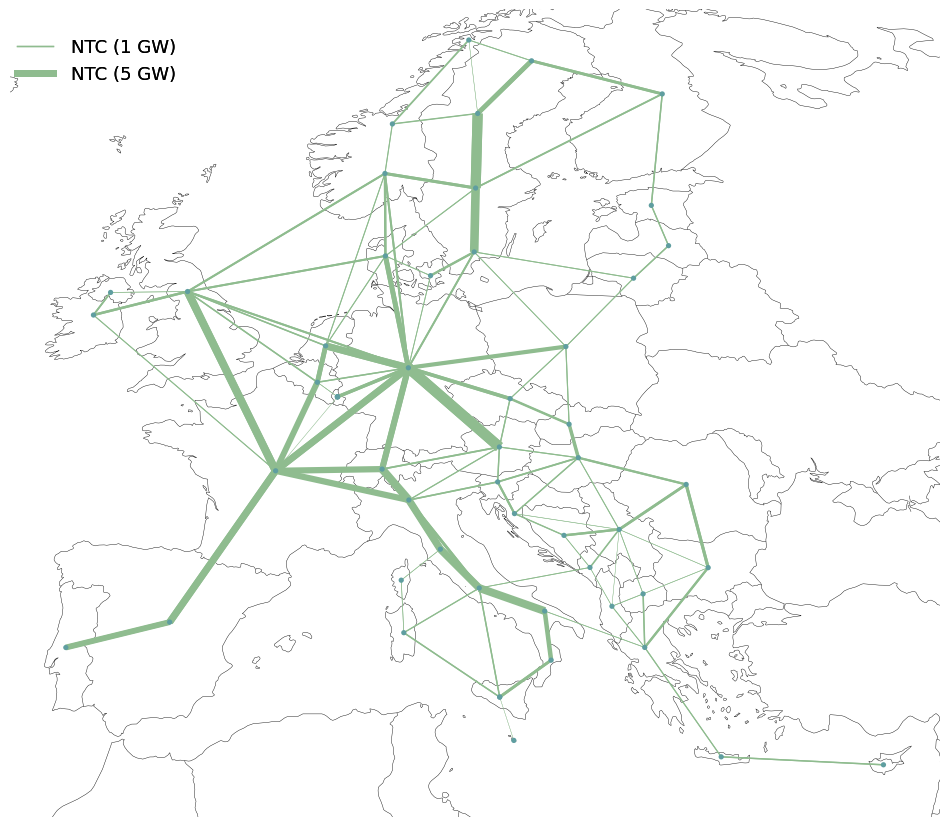
You’ve just created the reference grid published in the Scenarios Methodology report from TYNDP 2024!
Task 3: Plotting the Electricity reference grid#
a) How would you change an NTC value in the reference grid?
Hint: You can use the .loc operator
b) How would add a new candidate to the reference grid? Choose one, add it to your network and plot the new network to verify
Hint: You can have a look at our minimal example from above and at the parameters of already included links for inspiration
# Your solution a)
# Your solution b)
Explore the Hydrogen reference grid#
Similar to the Electricity reference grid, the H2 reference grid in the PyPSA model was implemented using the link component to represent the transport model of the Scenario Building.
Let’s have a look at those Hydrogen reference grid links:
reference_grid_h2 = n2.links.query("carrier == 'H2 pipeline'")
reference_grid_h2.head()
| bus0 | bus1 | bus2 | bus3 | bus4 | type | carrier | efficiency | efficiency2 | efficiency3 | ... | geometry | underwater_fraction | voltage | reversed | dc | length_original | tags | underground | location | under_construction | |
|---|---|---|---|---|---|---|---|---|---|---|---|---|---|---|---|---|---|---|---|---|---|
| name | |||||||||||||||||||||
| H2 pipeline AT -> DE | AT H2 Z2 | DE H2 Z2 | H2 pipeline | 1.0 | 1.0 | 1.0 | ... | NaN | NaN | False | NaN | 768.287118 | NaN | NaN | |||||||
| H2 pipeline AT -> IBIT | AT H2 Z2 | IBIT H2 Z2 | H2 pipeline | 1.0 | 1.0 | 1.0 | ... | NaN | NaN | False | NaN | 694.620395 | NaN | NaN | |||||||
| H2 pipeline AT -> SI | AT H2 Z2 | SI H2 Z2 | H2 pipeline | 1.0 | 1.0 | 1.0 | ... | NaN | NaN | False | NaN | 247.449222 | NaN | NaN | |||||||
| H2 pipeline AT -> SK | AT H2 Z2 | SK H2 Z2 | H2 pipeline | 1.0 | 1.0 | 1.0 | ... | NaN | NaN | False | NaN | 469.275999 | NaN | NaN | |||||||
| H2 pipeline BE -> DE | BE H2 Z2 | DE H2 Z2 | H2 pipeline | 1.0 | 1.0 | 1.0 | ... | NaN | NaN | False | NaN | 552.792303 | NaN | NaN |
5 rows × 65 columns
Again, it’s a lot of information! Let’s filter out some useful attributes.
reference_grid_h2.loc[:, ["bus0", "bus1", "p_nom", "p_nom_opt", "length"]].head()
| bus0 | bus1 | p_nom | p_nom_opt | length | |
|---|---|---|---|---|---|
| name | |||||
| H2 pipeline AT -> DE | AT H2 Z2 | DE H2 Z2 | 6250.0 | 0.0 | 768.287118 |
| H2 pipeline AT -> IBIT | AT H2 Z2 | IBIT H2 Z2 | 5250.0 | 0.0 | 694.620395 |
| H2 pipeline AT -> SI | AT H2 Z2 | SI H2 Z2 | 0.0 | 0.0 | 247.449222 |
| H2 pipeline AT -> SK | AT H2 Z2 | SK H2 Z2 | 6000.0 | 0.0 | 469.275999 |
| H2 pipeline BE -> DE | BE H2 Z2 | DE H2 Z2 | 3790.0 | 0.0 | 552.792303 |
Task 4: Exploring the Hydrogen reference grid#
Let’s focus on interconnections between two specific countries.
a) Choose two countries and find the right H2 pipelines connecting the two
Hint: use pandas query method
Again, we can compute the total transmission capacity of the system in TWkm.
b) Without looking at the previous section, can you remember how to calculate this?
# Your solution a)
# Your solution b)
Plotting the Hydrogen reference grid#
Again, we can also use PyPSA’s built in interactive n.plot.explore() function to explore the hydrogen reference grid.
As we can see, the spatial resolution of the H2 reference grid is different to the electricity reference grid.
# create a copy of the network which only includes electricity
n_h2_grid = n2.copy()
n_h2_grid.remove("Bus", n_h2_grid.buses.query("carrier != 'H2'").index)
n_h2_grid.remove("Link", n_h2_grid.links.query("p_nom == 0").index)

# explore the reference grid
n_h2_grid.plot.explore()
WARNING:pypsa.plot.maps.interactive:Dropping 209 row(s) in 'Link' with missing buses
We can also plot the hydrogen grid by utilizing another handy plotting function:
def plot_h2_reference_grid(
    n,
    proj,
    lw_factor=4e3,
    figsize=(12, 12),
    color_h2_pipe="#499a9c",
    color_h2_node="#ff29d9",
):
    n = n.copy()

    n.links.drop(
        n.links.index[~n.links.carrier.str.contains("H2 pipeline")], inplace=True
    )
    h2_pipes = n.links[n.links.carrier == "H2 pipeline"].p_nom

    link_widths_total = h2_pipes / lw_factor
    if link_widths_total.notnull().empty:
        print("No base H2 pipeline capacities to plot.")
        return
    link_widths_total = link_widths_total.reindex(n.links.index).fillna(0.0)

    n.buses.drop(n.buses.index[~n.buses.carrier.str.contains("H2")], inplace=True)

    fig, ax = plt.subplots(figsize=figsize, subplot_kw={"projection": proj})

    n.plot.map(
        geomap=True,
        bus_sizes=0.1,
        bus_colors=color_h2_node,
        link_colors=color_h2_pipe,
        link_widths=link_widths_total,
        branch_components=["Link"],
        ax=ax,
    )

    sizes = [30, 10]
    labels = [f"{s} GW" for s in sizes]
    scale = 1e3 / 4e3
    sizes = [s * scale for s in sizes]

    legend_kw = dict(
        loc="upper left",
        bbox_to_anchor=(0.005, 1.1),
        frameon=False,
        ncol=2,
        labelspacing=0.8,
        handletextpad=1,
    )

    add_legend_lines(
        ax,
        sizes,
        labels,
        patch_kw=dict(color="lightgrey"),
        legend_kw=legend_kw,
    )

    legend_kw = dict(
        loc="upper left",
        bbox_to_anchor=(0.15, 1.13),
        labelspacing=0.8,
        handletextpad=0,
        frameon=False,
    )

    add_legend_circles(
        ax,
        sizes=[0.2],
        labels=["H2 Node"],
        srid=n.srid,
        patch_kw=dict(facecolor=color_h2_node),
        legend_kw=legend_kw,
    )

    legend_kw = dict(
        loc="upper left",
        bbox_to_anchor=(0, 1.13),
        ncol=1,
        frameon=False,
    )

    add_legend_patches(ax, [color_h2_pipe], ["H2 Pipeline"], legend_kw=legend_kw)

    ax.set_facecolor("white")

    plt.show()
plot_h2_reference_grid(n_h2_grid, proj)
/tmp/ipykernel_2630/1499886571.py:66: UserWarning: When combining n.plot() with other plots on a geographical axis, ensure n.plot() is called first or the final axis extent is set initially (ax.set_extent(boundaries, crs=crs)) for consistent legend circle sizes.
  add_legend_circles(
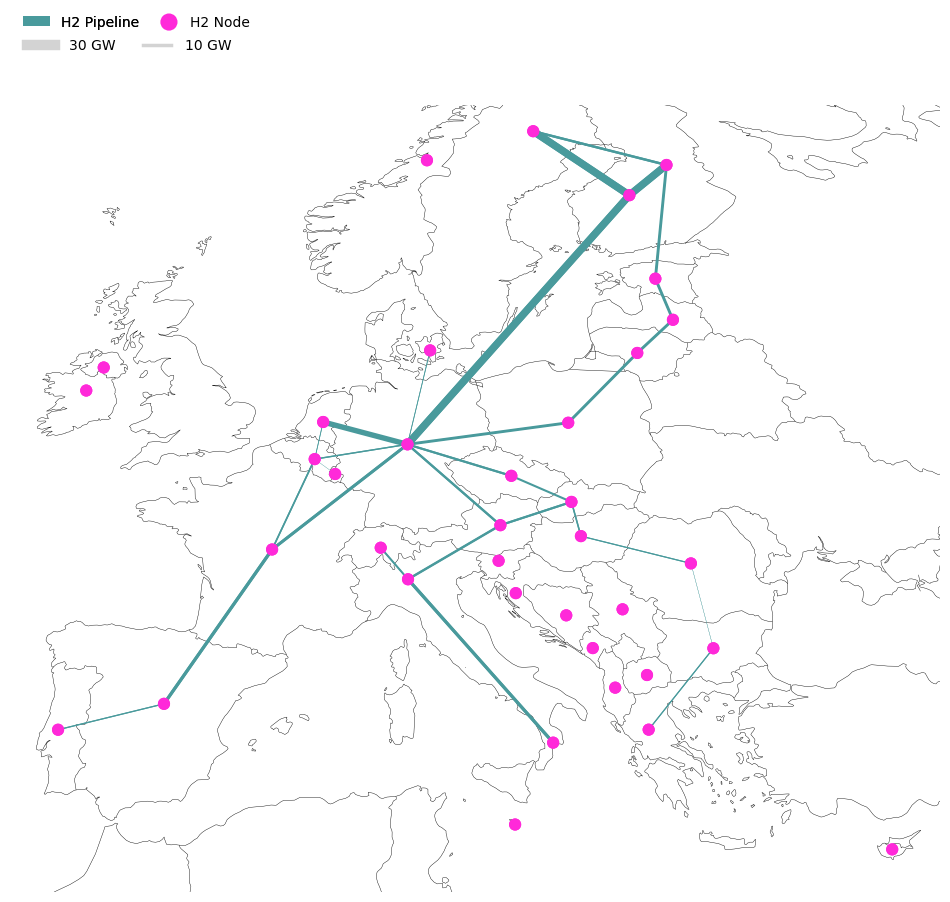
You’ve just created the hydrogen reference grid published in the Scenarios Methodology report from TYNDP 2024!
Task 5: Reference grid coupling in Italy#
As you know, the geographical resolution of the electricity and hydrogen grids are different.
Take some time to verify the coupling between electricity and hydrogen in Italy.
# Your solution
Extracting insights & Visualization#
Import the solved model#
n3 = pypsa.Network("post-network.nc")
WARNING:pypsa.network.io:Importing network from PyPSA version v0.34.1 while current version is v1.2.4. Read the release notes at `https://go.pypsa.org/release-notes` to prepare your network for import.
INFO:pypsa.network.io:Imported network 'PyPSA-Eur (tyndp-raw)' has buses, carriers, generators, global_constraints, links, loads, shapes, storage_units, stores
Extract insights from the network using PyPSA.statistics#
Let’s investigate the results from the solved model. For convenience, let’s save the accessor in a variable.
The full API documentation is available in pypsa documentation.
s = n3.statistics
You can easily get a comprehensive overview of the system-level results.
s().head()
| Optimal Capacity | Installed Capacity | Supply | Withdrawal | Energy Balance | Transmission | Capacity Factor | Curtailment | Capital Expenditure | Operational Expenditure | Revenue | Market Value | ||
|---|---|---|---|---|---|---|---|---|---|---|---|---|---|
| Generator | Offshore Wind (AC) | 59667.63846 | 6580.28372 | 2.336326e+08 | 0.0 | 2.336326e+08 | 0.0 | 0.446983 | 1.628091e+07 | 1.206196e+10 | 5.772445e+06 | 1.371072e+10 | 58.684940 |
| Offshore Wind (DC) | 79517.60138 | 13350.65347 | 3.836668e+08 | 0.0 | 3.836668e+08 | 0.0 | 0.550791 | 7.110183e+06 | 1.832538e+10 | 9.456484e+06 | 2.127265e+10 | 55.445638 | |
| Offshore Wind (Floating) | 26188.43674 | 5074.35608 | 1.057571e+08 | 0.0 | 1.057571e+08 | 0.0 | 0.460994 | 9.206199e+05 | 6.145530e+09 | 2.566804e+06 | 5.906603e+09 | 55.850669 | |
| Onshore Wind | 313677.75700 | 184845.68700 | 7.470741e+08 | 0.0 | 7.470741e+08 | 0.0 | 0.271879 | 1.783103e+07 | 3.629873e+10 | 1.861170e+07 | 3.442422e+10 | 46.078722 | |
| Run of River | 47774.12902 | 47774.12902 | 1.704413e+08 | 0.0 | 1.704413e+08 | 0.0 | 0.407266 | 3.359915e+04 | 1.472257e+10 | 1.700200e+06 | 1.066173e+10 | 62.553712 |
Let’s have a look at optimal renewable capacities.
(
    s.optimal_capacity(
        bus_carrier=["AC", "low voltage"],
        comps="Generator",
    ).div(
        1e3
    )  # GW
)
carrier
Offshore Wind (AC)           59.667638
Offshore Wind (DC)           79.517601
Offshore Wind (Floating)     26.188437
Onshore Wind                313.677757
Run of River                 47.774129
Solar                       152.958181
solar rooftop               694.672489
solar-hsat                   73.592653
dtype: float64
You can get it as fancy as you want!
(
    s.optimal_capacity(
        bus_carrier=["AC", "low voltage"],
        groupby=["location", "carrier"],
        comps="Generator",
    )
    .div(1e3)  # GW
    .to_frame(name="p_nom_opt")
    .pivot_table(index="location", columns="carrier", values="p_nom_opt")
    .fillna(0)
    .assign(Total=lambda df: df.sum(axis=1))
    .sort_values(by="Total", ascending=False)
    .round(2)
).head()
| carrier | Offshore Wind (AC) | Offshore Wind (DC) | Offshore Wind (Floating) | Onshore Wind | Run of River | Solar | solar rooftop | solar-hsat | Total |
|---|---|---|---|---|---|---|---|---|---|
| location | |||||||||
| DE00 | 4.24 | 21.70 | 0.53 | 56.42 | 4.76 | 53.67 | 80.41 | 0.00 | 221.73 |
| FR00 | 27.60 | 6.91 | 21.12 | 17.48 | 6.51 | 11.06 | 122.71 | 0.00 | 213.39 |
| GB00 | 8.61 | 3.28 | 3.57 | 81.05 | 2.87 | 12.52 | 42.45 | 0.00 | 154.36 |
| ES00 | 0.00 | 0.00 | 0.00 | 26.81 | 0.28 | 10.14 | 84.74 | 29.85 | 151.83 |
| PL00 | 5.17 | 5.81 | 0.00 | 19.71 | 0.18 | 3.95 | 37.31 | 0.00 | 72.13 |
Task: Take some time and try to fine tune this query to your needs
We can also easily look into the energy balance for a specific carrier by Node.
So, let’s investigate the Hydrogen balance at the Z1 and Z2 nodes of Germany (DE):
df = (
    s.energy_balance(groupby=["bus_carrier", "country", "bus", "carrier", "name"])
    .div(1e6)  # TWh
    .to_frame(name="Balance [TWh]")
    .query(
        "(bus_carrier.str.contains('Hydrogen')) "
        "and (country == 'DE') "
        " and (abs(`Balance [TWh]`) > 1e-2)"
    )
    .round(2)
)
df
| Balance [TWh] | ||||||
|---|---|---|---|---|---|---|
| component | bus_carrier | country | bus | carrier | name | |
| Link | Hydrogen Storage | DE | DE H2 Z1 | H2 pipeline | H2 pipeline DEH2Z1 -> DEH2Z2 | -24.18 |
| SMR CC | DE H2 Z1 SMR CC | 24.18 | ||||
| DE H2 Z2 | H2 pipeline | H2 pipeline DE -> AT | -1.72 | |||
| H2 pipeline DE -> CZ | -0.18 | |||||
| H2 pipeline DE -> FR | -0.07 | |||||
| H2 pipeline DE -> IBFI | -0.97 | |||||
| H2 pipeline DE -> PL | -21.63 | |||||
| H2 pipeline DEH2Z1 -> DEH2Z2 | 24.18 | |||||
| H2 pipeline DK -> DE | 13.88 | |||||
| H2 pipeline FR -> DE | 2.59 | |||||
| H2 pipeline NL -> DE | 1.39 | |||||
| Load | Hydrogen Storage | DE | DE H2 Z2 | H2 for industry | DE00 H2 Z2 for industry | -17.46 |
# verify energy balance
df.groupby(by="bus").sum()
| Balance [TWh] | |
|---|---|
| bus | |
| DE H2 Z1 | 0.00 |
| DE H2 Z2 | 0.01 |
exports = df.query("name.str.contains('DE ->')")
export_twh = exports["Balance [TWh]"].sum().round(2)
print(f"DE exports {export_twh} TWh of H2.")

imports = df.query(
    "(name.str.contains('-> DE')) and not (name.str.contains('Z1')) and not (name.str.contains('Z2'))"
)
import_twh = imports["Balance [TWh]"].sum().round(2)
print(f"DE imports {import_twh} TWh of H2.")

balance_twh = import_twh + export_twh
print(
    f"DE is a net {'importer' if balance_twh > 0 else 'exporter'} ({balance_twh.round(2)} TWh)."
)
DE exports -24.57 TWh of H2.
DE imports 17.86 TWh of H2.
DE is a net exporter (-6.71 TWh).
… or look at renewable curtailment in the system:
(
    s.curtailment(
        bus_carrier=["AC", "low voltage"],
        groupby=["location", "carrier"],
    )
    .div(1e6)  # TWh
    .to_frame(name="p_nom_opt")
    .pivot_table(index="location", columns="carrier", values="p_nom_opt")
    .fillna(0)
    .assign(Total=lambda df: df.sum(axis=1))
    .sort_values(by="Total", ascending=False)
    .round(2)
).head()
| carrier | Offshore Wind (AC) | Offshore Wind (DC) | Offshore Wind (Floating) | Onshore Wind | Pumped Hydro Storage | Reservoir & Dam | Run of River | Solar | solar rooftop | solar-hsat | Total |
|---|---|---|---|---|---|---|---|---|---|---|---|
| location | |||||||||||
| ES00 | 0.00 | 0.00 | 0.00 | 2.75 | 84.42 | 98.52 | 0.0 | 0.01 | 3.22 | 3.35 | 192.28 |
| CH00 | 0.00 | 0.00 | 0.00 | 0.00 | 48.19 | 68.73 | 0.0 | 0.05 | 0.36 | 0.04 | 117.37 |
| NOS0 | 0.00 | 0.00 | 0.00 | 0.00 | 1.53 | 113.26 | 0.0 | 0.00 | 0.00 | 0.00 | 114.79 |
| FR00 | 5.61 | 0.93 | 0.61 | 0.57 | 40.16 | 27.26 | 0.0 | 0.01 | 0.99 | 0.00 | 76.15 |
| AT00 | 0.00 | 0.00 | 0.00 | 0.01 | 50.25 | 20.30 | 0.0 | 0.01 | 0.15 | 0.30 | 71.02 |
Task: Explore the pypsa documentation and try this out yourself
Visualizing results using PyPSA.statistics#
The PyPSA.statistics module can also be used to create some really handy static plots to investigate the results of a model.
# let's fill missing colors first
n3.carriers.loc["none", "color"] = "#000000"
n3.carriers.loc["", "color"] = "#000000"
Let’s now plot the optimal renewable capacities that we investigated before.
s.optimal_capacity.plot.bar(
    bus_carrier="AC",
    query="value>1e3",
    height=6,
);
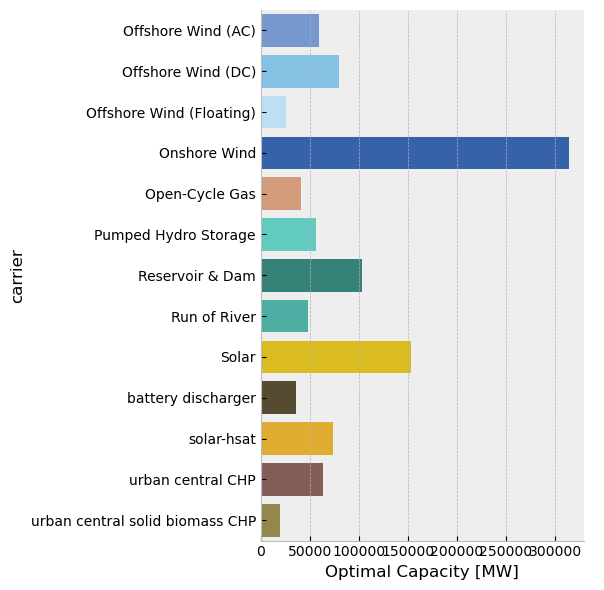
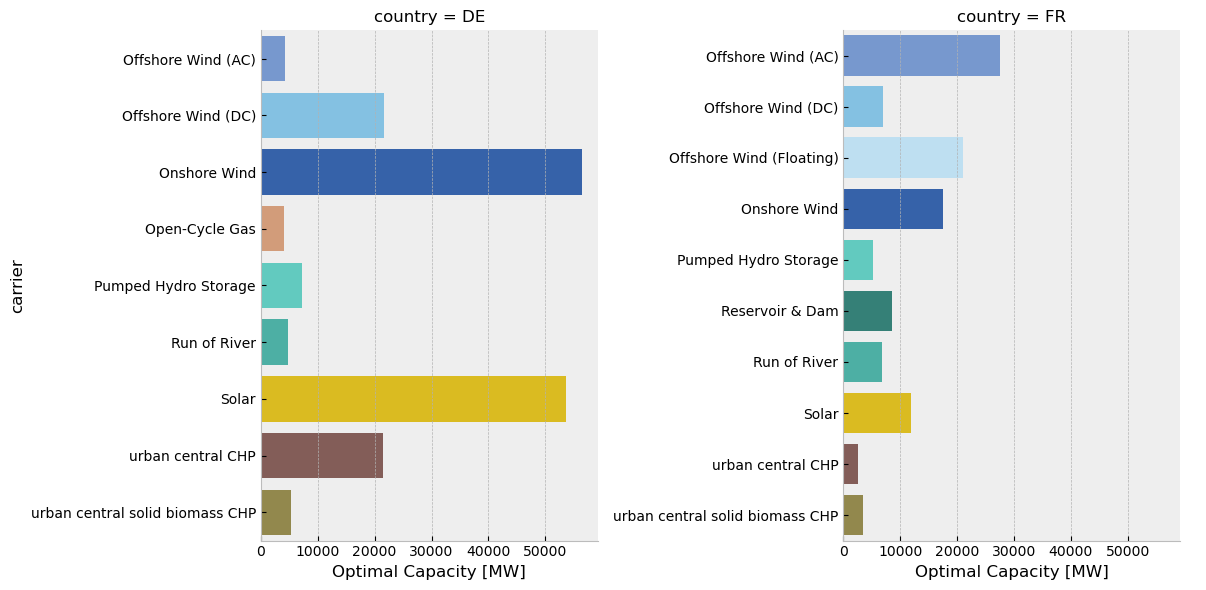
You can also have details for specific countries.
s.optimal_capacity.plot.bar(
    bus_carrier="AC",
    query="value>1e3 and country in ['DE', 'FR']",
    height=6,
    facet_col="country",
);
You can have a closer look at the wind production.
s.energy_balance.plot.line(
    facet_row="bus_carrier",
    y="value",
    x="snapshot",
    carrier="wind",
    nice_names=False,
    color="carrier",
    aspect=5.0,
);

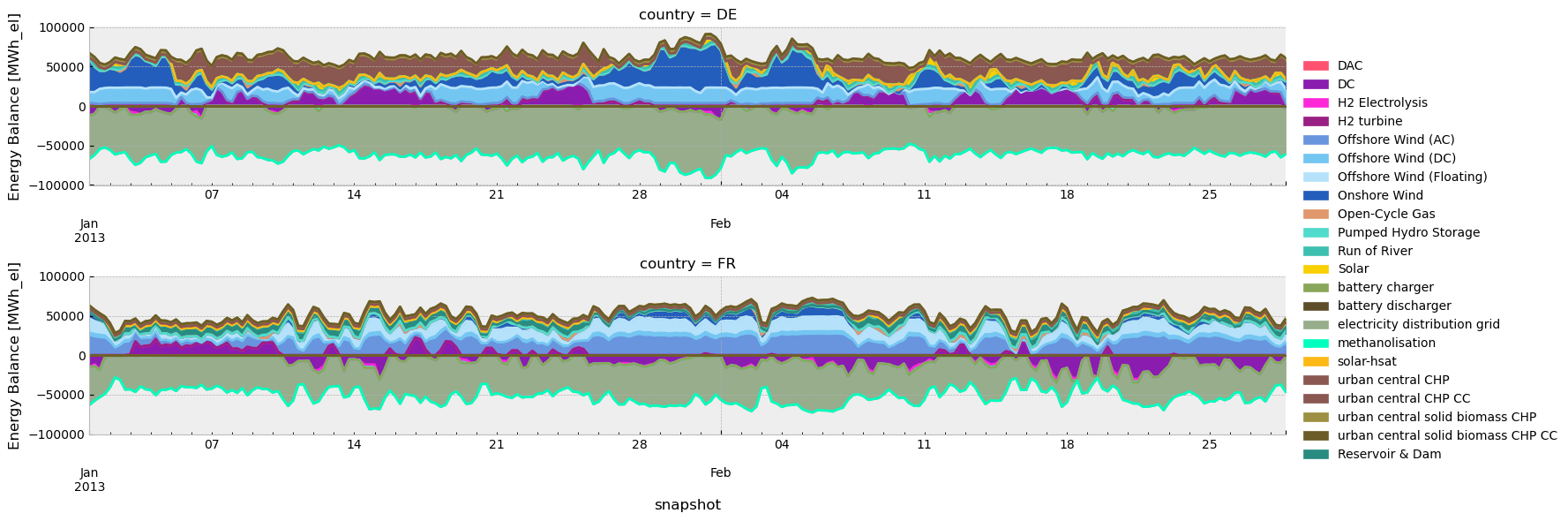
… or look at the dispatch for specific countries.
s.energy_balance.plot.area(
    bus_carrier=["AC"],
    y="value",
    x="snapshot",
    color="carrier",
    stacked=True,
    facet_row="country",
    query="country in ['DE', 'FR'] and snapshot < '2013-03'",
    aspect=5,
);
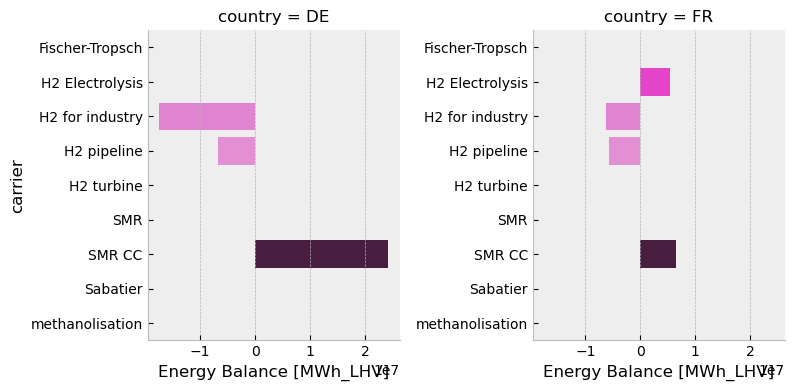
You can also explore H2 results.
s.energy_balance.plot.bar(
    bus_carrier=["H2"],
    y="carrier",
    x="value",
    color="carrier",
    facet_col="country",
    height=4,
    aspect=1,
    query="country in ['DE', 'FR']",
);
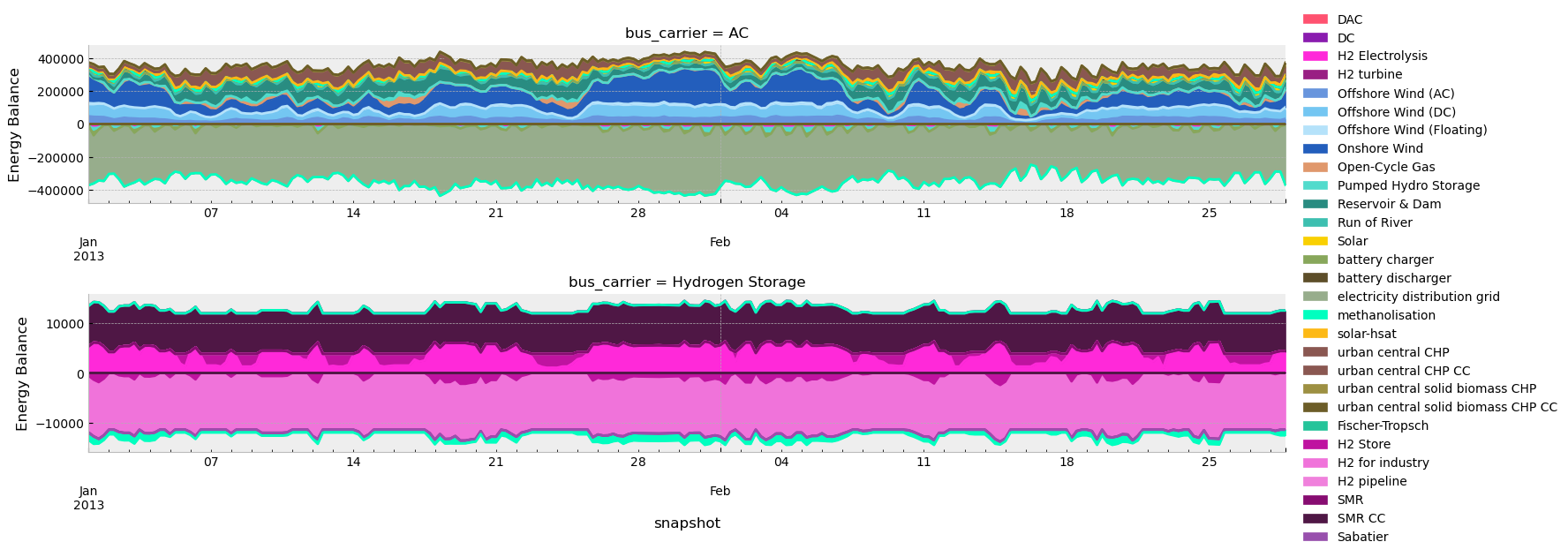
You can also explore the correlation between renewable production and hydrogen.
s.energy_balance.plot.area(
    bus_carrier=["AC", "H2"],
    y="value",
    x="snapshot",
    color="carrier",
    stacked=True,
    facet_row="bus_carrier",
    sharex=False,
    sharey=False,
    query="snapshot < '2013-03'",
    aspect=5,
);
WARNING:pypsa.network.descriptors:Multiple units found for carrier ['AC', 'H2']: ['MWh_el' 'MWh_LHV']
There is also the possibility to explore maps.
subplot_kw = {"projection": proj}
fig, ax = plt.subplots(figsize=(12, 12), subplot_kw=subplot_kw)
s.energy_balance.plot.map(
    bus_carrier="H2",
    ax=ax,
    bus_area_fraction=0.007,
    flow_area_fraction=0.004,
    legend_circles_kw=dict(
        frameon=False,
        labelspacing=0.8,
        handletextpad=1.5,
    ),
    legend_arrows_kw=dict(
        frameon=False,
        labelspacing=0.8,
        handletextpad=1.5,
    ),
);
/home/runner/miniconda3/envs/open-tyndp-workshops/lib/python3.13/site-packages/pypsa/plot/statistics/maps.py:238: UserWarning: When combining n.plot() with other plots on a geographical axis, ensure n.plot() is called first or the final axis extent is set initially (ax.set_extent(boundaries, crs=crs)) for consistent legend semicircle sizes.
  add_legend_semicircles(
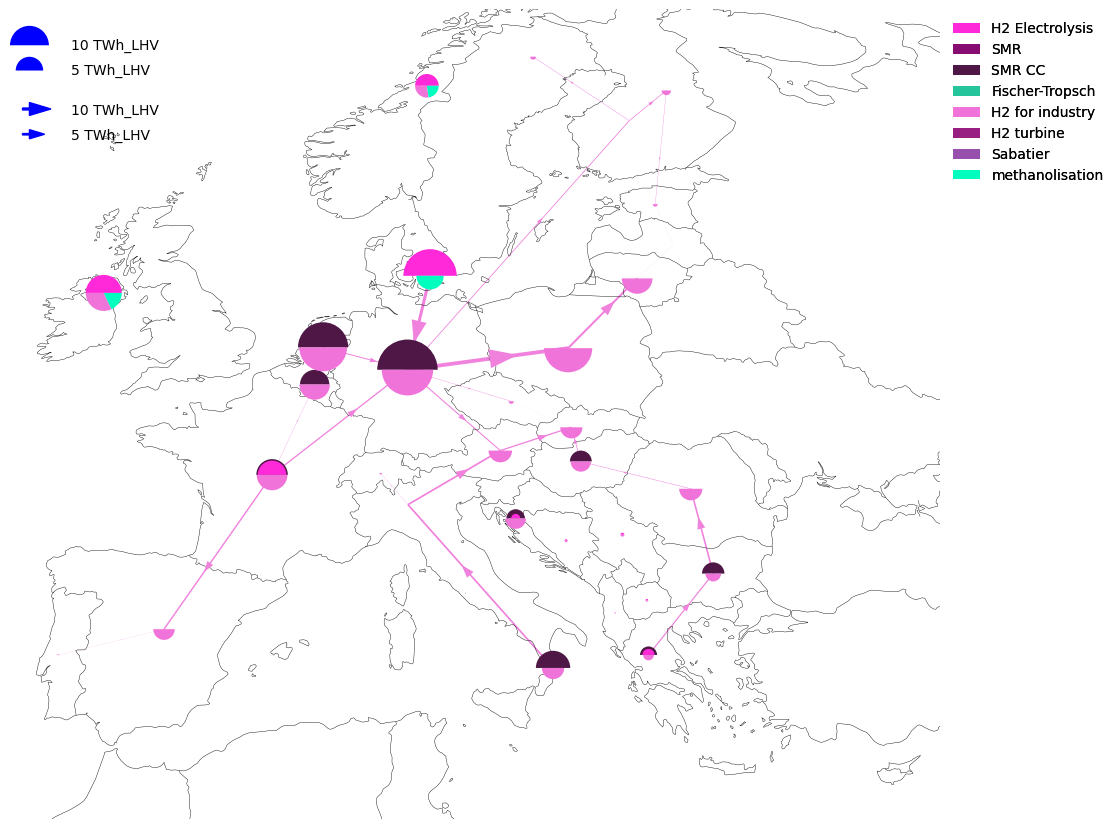
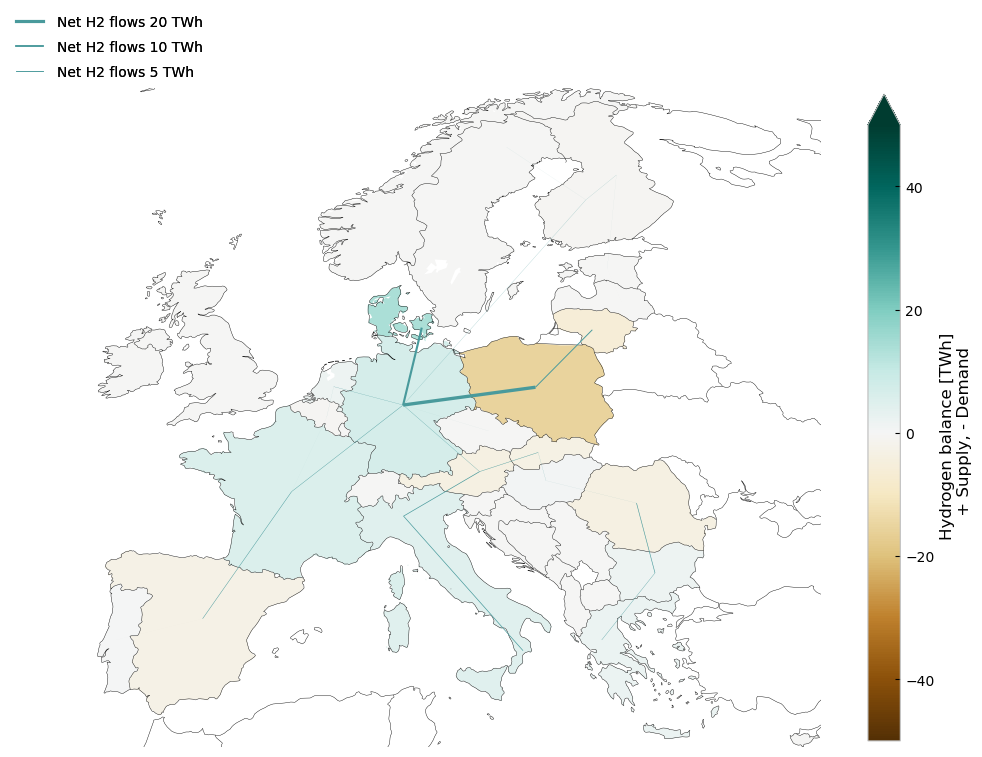
But, to get something neat, you might need to code it yourself. Indeed, with some tweaking and construction, we can use PyPSA’s plotting to create some really cool visualizations of the resulting net hydrogen flows in the network.
def plot_net_H2_flows(n, regions, countries=[], figsize=(12, 12)):
    network = n.copy()
    if "H2 pipeline" not in n.links.carrier.unique():
        return
    if len(countries) == 0:
        countries = regions.index.values

    linewidth_factor = 9e6
    # MW below which not drawn
    line_lower_threshold = 1e2
    min_energy = 0
    lim = 50
    link_color = "#499a9c"
    flow_factor = 100

    # get H2 energy balance per node
    carrier = "H2"
    h2_energy_balance = network.statistics.energy_balance(
        bus_carrier="H2", comps=["Link", "Load"], groupby=["country", "carrier"]
    ).to_frame()

    to_drop = ["H2 pipeline"]
    # drop pipelines and storages from energy balance
    h2_energy_balance.drop(h2_energy_balance.loc[:, :, to_drop, :].index, inplace=True)
    # filter for countries
    h2_energy_balance = h2_energy_balance.loc[:, countries, :, :]
    regions = regions.loc[countries]

    regions["H2"] = h2_energy_balance.groupby("country").sum().div(1e6)  # TWh

    # Drop non-hydrogen buses so they don't clutter the plot
    # And filter for countries
    network.buses.drop(network.buses.query("carrier != 'H2'").index, inplace=True)
    network.buses.drop(
        network.buses.query("country not in @countries").index, inplace=True
    )

    # drop all links which are not H2 pipelines
    network.links.drop(
        network.links.index[~network.links.carrier.str.contains("H2 pipeline")],
        inplace=True,
    )

    network.links["flow"] = network.snapshot_weightings.generators @ network.links_t.p0

    positive_order = network.links.bus0 < network.links.bus1
    swap_buses = {"bus0": "bus1", "bus1": "bus0"}
    network.links.loc[~positive_order] = network.links.rename(columns=swap_buses)
    network.links.loc[~positive_order, "flow"] = -network.links.loc[
        ~positive_order, "flow"
    ]
    network.links.index = network.links.apply(
        lambda x: f"H2 pipeline {x.bus0} -> {x.bus1}", axis=1
    )
    network.links = network.links.groupby(network.links.index).agg(
        dict(flow="sum", bus0="first", bus1="first", carrier="first", p_nom_opt="sum")
    )
    network.links.flow = network.links.flow.where(network.links.flow.abs() > min_energy)

    # drop links not connecting countries in country list
    network.links.drop(
        network.links.loc[
            (
                (~network.links.bus0.str.contains("|".join(countries)))
                | (~network.links.bus1.str.contains("|".join(countries)))
            )
        ].index,
        inplace=True,
    )

    proj = ccrs.EqualEarth()
    coords = regions.get_coordinates()
    map_opts["boundaries"] = [
        x for y in zip(coords.min().values, coords.max().values) for x in y
    ]
    regions = regions.to_crs(proj.proj4_init)

    fig, ax = plt.subplots(figsize=figsize, subplot_kw={"projection": proj})

    link_widths_flows = network.links.flow.div(linewidth_factor).fillna(0)

    network.plot.map(
        geomap=True,
        bus_sizes=0,
        link_colors=link_color,
        link_widths=link_widths_flows,
        branch_components=["Link"],
        ax=ax,
        line_flow=pd.concat({"Link": link_widths_flows * flow_factor}),
        **map_opts,
    )

    regions.plot(
        ax=ax,
        column="H2",
        cmap="BrBG",
        linewidths=0,
        legend=True,
        vmax=lim,
        vmin=-lim,
        legend_kwds={
            "label": "Hydrogen balance [TWh] \n + Supply, - Demand",
            "shrink": 0.7,
            "extend": "max",
        },
    )

    legend_kw = dict(
        loc="upper left",
        bbox_to_anchor=(-0.1, 1.13),
        frameon=False,
        labelspacing=0.8,
        handletextpad=1,
    )

    sizes = [20, 10, 5]
    labels = [f"Net H2 flows {s} TWh" for s in sizes]
    scale = 1e6 / linewidth_factor
    sizes = [s * scale for s in sizes]
    add_legend_lines(
        ax,
        sizes,
        labels,
        patch_kw=dict(color=link_color),
        legend_kw=legend_kw,
    )

    ax.set_facecolor("white")


map_opts = {
    "boundaries": [-11, 30, 34, 71],
    "geomap_colors": {
        "ocean": "white",
        "land": "white",
    },
}
h2_regions = bz.dissolve(by="country")
plot_net_H2_flows(n3, h2_regions)
/home/runner/miniconda3/envs/open-tyndp-workshops/lib/python3.13/site-packages/cartopy/io/__init__.py:242: DownloadWarning: Downloading: https://naturalearth.s3.amazonaws.com/50m_physical/ne_50m_land.zip
  warnings.warn(f'Downloading: {url}', DownloadWarning)
/home/runner/miniconda3/envs/open-tyndp-workshops/lib/python3.13/site-packages/cartopy/io/__init__.py:242: DownloadWarning: Downloading: https://naturalearth.s3.amazonaws.com/50m_physical/ne_50m_ocean.zip
  warnings.warn(f'Downloading: {url}', DownloadWarning)
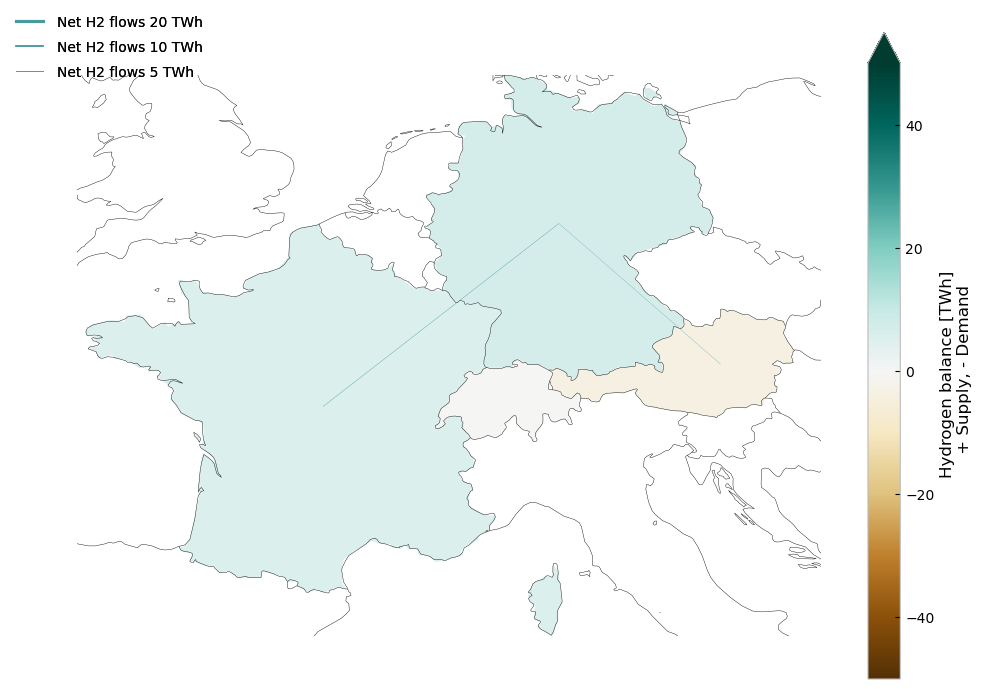
Or, if you want to zoom on specific countries.
plot_net_H2_flows(n3, h2_regions, countries=["DE", "FR", "CH", "AT"])
Task: Take some time to play around with the introduced plotting functions
Solutions#
Task 1: Add another town to the model#
n1 = pypsa.Network("n1.nc")
INFO:pypsa.network.io:Imported network 'Demo' has buses, carriers, generators, loads, sub_networks